CI-CD for Monorepo on Kubernetes

To do or not to do Monorepo is the big question of 2019! It started with Matt Klein’s post against Monorepos to which Adam Jacob’s post has an excellent counterpoint. There is also the post specifically focusing around the scalability issue of Monorepos here. We will not debate more on the same topic as it has been covered in depth, instead, we will focus on building a CI/CD pipeline for Kubernetes if you are using monorepos in your organization.
In this post, we will talk about building a CI/CD pipeline if you are using a Monorepo structure and want to deploy your services on a Kubernetes cluster. The folks at Shippable have written a very good article on CI/CD for microservices using Monorepos (Link here) specifically targeted at deploying to ECS. In this example, we will use Helm to deploy services from monorepo to a Kubernetes cluster. Basic familiarity with Kubernetes and Helm will be helpful to follow along with the tutorial but is not absolutely necessary for understanding the overall tutorial.
Code Structure & CI
We will use two distinct microservices – the API and www which are housed in a monorepo. The code is forked from Shippable example mentioned earlier and can be found here. The API is a backend application and www is the front end of the application. Each service has its own Dockerfile which is used to build the image for respective service. Apart from that, a few key points about the repo are:
- The original repo had a script called “detect-changed-services.sh” which was used to detect which service changed and trigger actions related only to that microservice. We would use similar logic in a Jenkinsfile here to detect which microservice changed.
- The Jenkins job gets triggered on a simple git commit and builds docker image only for the service that changed.
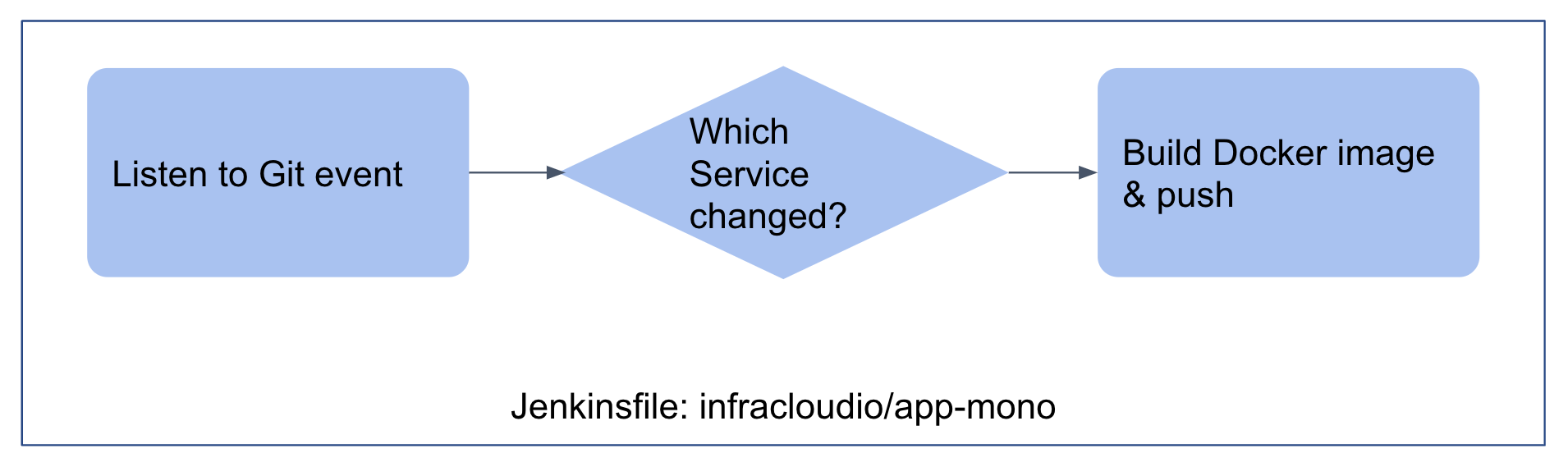 As soon as the CI job finishes pushing the image to Docker registry the
webhook is called. This webhook invokes a job which updates the values
file in the helm chart repo with the latest tag from docker image. We
will talk about the structure of Helm chart shortly but the Jenkins job
which orchestrates the change in values.yaml file when a Docker image is
pushed is in repo https://github.com/infracloudio/app-mono-orchestrator
(Jenkinsfile)
As soon as the CI job finishes pushing the image to Docker registry the
webhook is called. This webhook invokes a job which updates the values
file in the helm chart repo with the latest tag from docker image. We
will talk about the structure of Helm chart shortly but the Jenkins job
which orchestrates the change in values.yaml file when a Docker image is
pushed is in repo https://github.com/infracloudio/app-mono-orchestrator
(Jenkinsfile)
Helm Chart Structure
Taking inspiration from the organization of the source code, we store the helm charts and configuration information in a monorepo fashion. There are two monorepos:
1) Monorepo which stores the Helm charts for all applications for the monorepo of application source code
├── README.md
└── charts
    ├── app-mono-api
    │   ├── Chart.yaml
    │   └── templates
    │       ├── _helpers.tpl
    │       ├── deployment.yaml
    │       └── service.yaml
    └── app-mono-www
        ├── Chart.yaml
        └── templates
            ├── _helpers.tpl
            ├── deployment.yaml
            └── service.yaml
2) Monorepo which stores the Helm state or value files for all applications for the monorepo of application source code
├── Jenkinsfile
├── README.md
├── app-mono-api
│   └── values.yaml
└── app-mono-www
    └── values.yaml
So as an engineering team, there are three monorepos now for a set of applications:
- Application source code monorepo
- Helm chart source monorepo
- Configuration change monorepo (Values.yaml is basically configuration for each chart)
Continuous Deployment
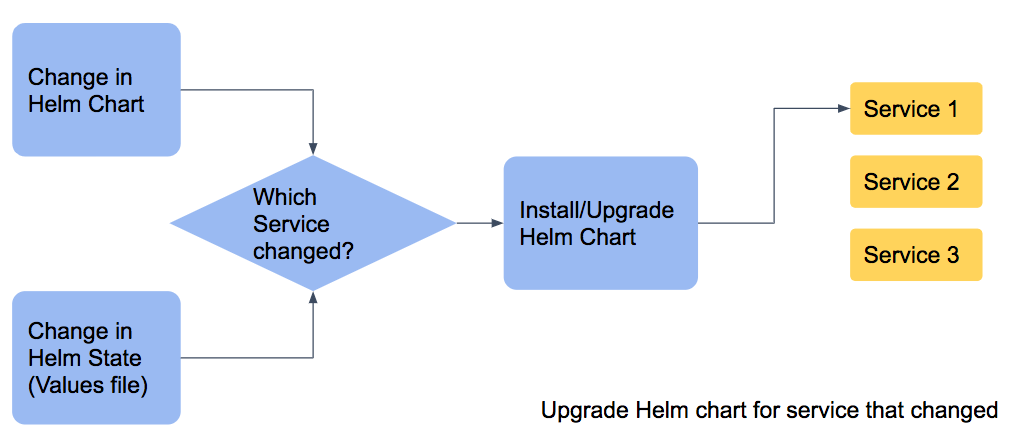
The change in application source monorepo will trigger a container image build job while change in any of last 2 repos (Helm charts and Helm state) will trigger a deployment job. The ease of managing one repository over multiple repositories is achieved while maintaining a source controlled and simple structure.
Setup Instructions
If you want to set up the above example on your own, you can follow the instructions in the Github repo here. You will need a Kubernetes cluster and access to create webhooks in Github repo and Docker hub to experiment with an end to end pipeline.
Conclusion
Monorepo may or may not work for your team based on your needs but if you are using a monorepo then having a proper CI/CD pipeline is crucial. In this post we explore one opinionated way of deploying applications in monorepo to Kubernetes. Monorepo for applications as well as Helm charts and values file makes it easy to manage the repository sprawl, while still maintaining the flexibility of deploying individual services.
Adopt Cloud Native Faster with InfraCloud's Expertise
Posts You Might Like